 Sleepeek
Why people record themselves at night
It usually starts with a comment in the morning: “you snored all night,” “you were talking at 3 a.m.” You don’t remember what you do while you sleep. A recording lets you hear it for yourself.
The most common reasons:
- finding out whether you snore, when you sleep alone or nobody tells you;
- hearing what you say in your sleep;
- counting your coughing fits when you have a cold;
- checking whether a remedy makes a difference (sleeping on your side, a nasal strip, no alcohol in the evening) by comparing several nights.
Voice recorder or an app that starts when it hears a sound
Your phone’s voice recorder can run all night, but it records everything, silence included. In the morning, you have a single file several hours long and no idea where to look. An app made for the night listens the whole time and only keeps the moments when the sound rises above the background noise.
| Voice recorder | App that starts when it hears a sound | |
|---|---|---|
| What’s kept | the whole night, in one block | only the sounds, a few seconds to a minute each |
| Finding a moment | by ear, skipping through the file | a list or timeline of the night, with the time of each sound |
| Sorting sounds | none | often sorted: snoring, talking, coughing |
| Storage on the phone | one large file per night | short clips |
Several apps do this on iPhone and Android. What changes from one app to another: how long you can record without paying, how many nights are kept and how sounds are sorted.
What you need
- Your phone, with the app installed and microphone access allowed.
- A charger, and an outlet close enough to the bed.
- A nightstand or another surface next to your head.
You don’t need an external microphone: the phone’s own microphone is enough to hear snoring, a sentence or a cough next to the bed.
Step by step
- Plug in the phone. The microphone runs for hours: on battery, the recording may stop before morning.
- Put it about 50 cm (20 inches) from your head, on the nightstand, screen up. Not under the pillow or the covers: fabric muffles sounds.
- Keep it away from sources of constant noise: a fan, an air purifier, white noise. They cover quiet sounds, like a whispered sentence.
- Turn on Do Not Disturb. This Focus silences notifications; you turn it on from Control Center by tapping Focus (Apple Support). Your alarm still goes off: alarms in the Clock app sound when Do Not Disturb or Silent mode is on (Apple Support).
- Start recording when you go to bed, then lock the screen. If you have a sleep schedule in the Health app, the Sleep Focus follows that schedule and turns on by itself (Apple Support); some apps can start at the same time.
- Stop recording when you wake up, or let the app stop at the set time if it can.
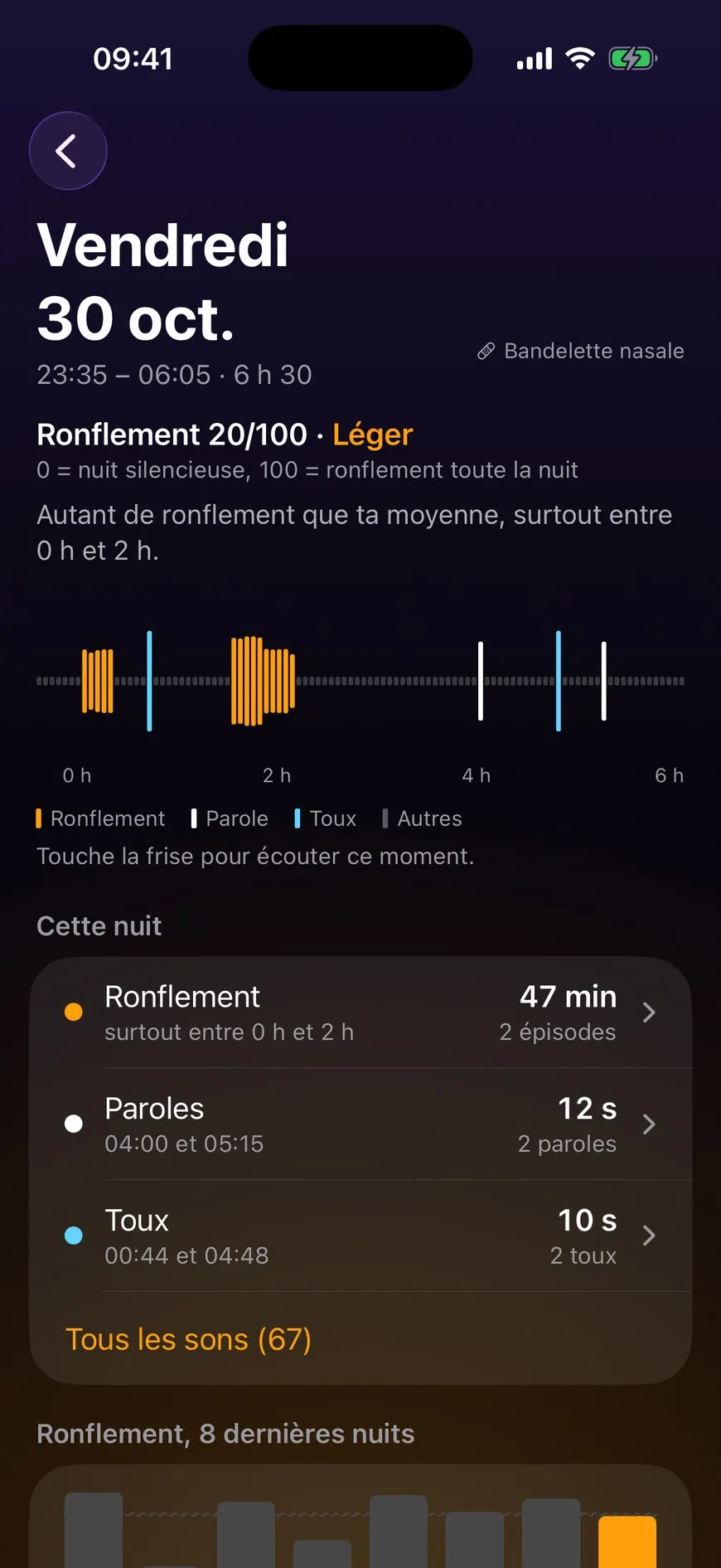
With Sleepeek, your night appears in the morning as a timeline: each sound at the time it happened, and you tap the timeline to listen back to a moment.
What you’ll hear
- Snoring, sometimes only at certain times, or only when you sleep on your back.
- Talking: a word, a name, bits of sentences, sometimes a laugh.
- Coughing, more often than you thought if you have a cold.
- Household noises: the heating coming on, a door, the street, a cat jumping on the bed.
- Sounds from the person sleeping next to you, if there is one.
A quiet night doesn’t prove much. Sleep changes from one night to the next: record yourself for several nights before drawing a conclusion.
Listening to your night in the morning
Listen in this order:
- Start with the overview: how many sounds, at what times.
- Listen to the loudest or longest ones.
- Listen to the talking, if there is any.
- Delete what doesn’t interest you (the heating, the street) and keep the useful clips.
To test a remedy, write down in the evening what you changed, and compare the nights with and without it. One night of each isn’t enough to decide.
What a recording doesn’t replace
A phone only hears sound. When a doctor suspects sleep apnea, the diagnosis requires a medical sleep study: respiratory polygraphy records, for at least 6 hours, the electrocardiogram, breathing movements, airflow through the nose and blood oxygen, with a sensor on the finger (ameli.fr, in French). An app measures none of this.
What an app gives you is a record: what you heard, at what time, over how many nights. Clips you can play help you describe to a doctor what happens at night.
When to see a doctor
France’s national health insurance (Assurance Maladie) lists these signs among the symptoms that suggest sleep apnea (ameli.fr, in French). If you recognize any of them, talk to your doctor:
- loud snoring, every night, for a long time;
- pauses in breathing or gasping, noticed by the person sleeping next to you;
- waking up suddenly with a choking feeling;
- daytime sleepiness that nothing else explains, or feeling more tired when you wake up than when you went to bed;
- severe tiredness, trouble concentrating, morning headaches.
Frequently asked questions
Does it drain the battery?
The microphone stays on all night, so the app uses more power than a phone on standby. The simplest fix is to keep the phone plugged in: you don't have to think about it, and the recording doesn't stop in the middle of the night.
Should I put my phone in Airplane Mode?
You don't need to. Airplane Mode turns off cellular data and Wi-Fi. To avoid being woken by a notification, Do Not Disturb is enough, and your alarm still goes off.
How much storage does it take?
An app that starts when it hears a sound only keeps short clips, from a few seconds to a minute. That takes far less space than recording the whole night. It's still worth deleting the nights you no longer need.
If I share the bed, does the app record the other person too?
Yes: the microphone picks up everything you can hear in the room. To find out who snores, move the phone closer to that person and listen to the clips: voices and breathing are easy to tell apart.
Sleepeek records your whole night for free: in the morning, you listen back to each sound at the time it happened.
Sources
- Apple Support, “Turn on or schedule a Focus on iPhone”, accessed November 2, 2026.
- Apple Support, “Set an alarm in Clock on iPhone”, accessed November 2, 2026.
- Apple Support, “Use Airplane Mode on your iPhone, iPad, Apple Watch, and Apple Vision Pro”, accessed November 2, 2026.
- Assurance Maladie (ameli.fr), « Symptômes, diagnostic et évolution de l'apnée du sommeil », August 7, 2026 (in French), accessed November 1, 2026.
Written by The Sleepeek team. How we write and check our guides.