 Sleepeek
What the app does while you sleep
The microphone stays on all night, but the app (also called a sleep recorder) doesn’t record everything. It keeps measuring the background noise of your bedroom: the usual quiet, with the fridge in the distance or the street. As soon as a sound rises above it by a set margin, the app starts a clip.
What happens next:
- The clip starts just before the sound. The app always keeps the last few seconds in memory, so you hear the start of the sentence, not just the end. Sleepeek keeps 2 seconds before and 2 seconds after each sound.
- It stops when the room is quiet again, or after a maximum length. In Sleepeek, a clip lasts 60 seconds at most; a long stretch of snoring is split into several clips, grouped together in the morning.
- The background noise adjusts by itself. If it rises during the night (the heating coming on, rain), the app adapts and stops keeping that steady noise.
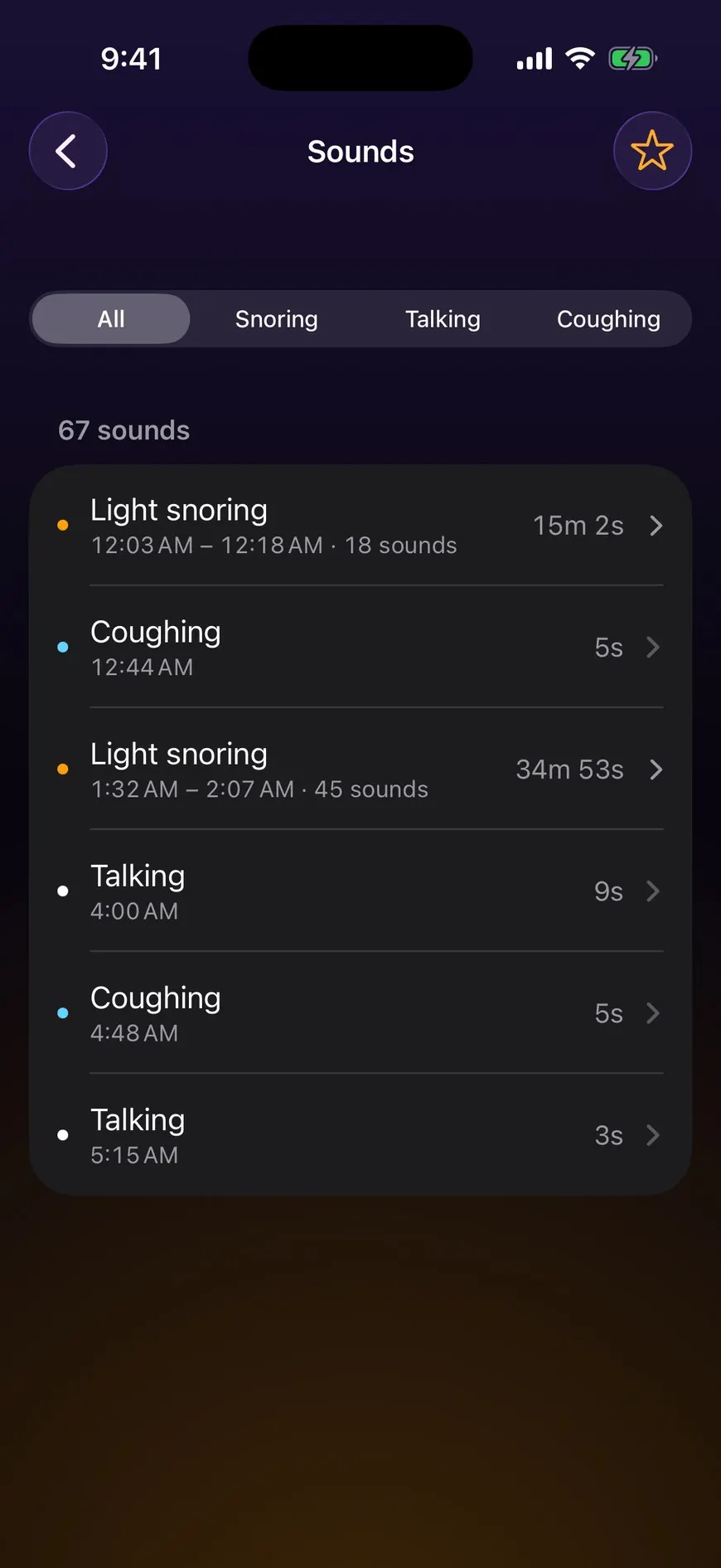
The result: instead of an eight-hour file, you get a list of short sounds, each with its time. That’s the difference from a voice recorder, explained in the guide to recording yourself sleeping.
How it tells snoring from talking
Each clip goes through a sound classifier: a model trained to recognize sounds from thousands of examples. On iPhone, Apple provides a built-in classifier, Sound Analysis, which can identify over 300 sounds (Apple Developer). An app can use it or its own model.
The classifier doesn’t decide on a single instant. It analyzes the clip in slices of a few seconds, and the clip gets the type that comes up most: snoring, talking, coughing, or “other” when nothing clearly stands out. Sleepeek works on 3-second slices, on the phone, without a connection.
This sorting is sometimes wrong. The most common mistakes:
- heavy breathing, mouth open, filed as snoring;
- a very short mumble, which can end up as “other” rather than talking (when people talk in their sleep, it’s often mumbling);
- the sounds of the person sleeping next to you, counted as yours.
So listen to the clips before you trust the totals, especially if you’re trying to find out whether you snore.
Where to put your phone
Distance matters more than the phone model. Too far, and a whispered sentence doesn’t rise above the background noise; too close, and every rustle of the sheets starts a clip.
- On the nightstand, about 50 cm (20 inches) from your head, screen up.
- Never under the pillow or the duvet: fabric muffles sounds.
- On the side of the person you want to record, if there are two of you.
- Away from a fan or an air purifier, which covers quiet sounds.
Sounds that fool the app
| Sound | What the app does with it | What to do |
|---|---|---|
| Fan, air purifier, white noise | it raises the background noise: quiet sounds get lost under it | move it away from the bed or turn it off for the test night |
| Heating or air conditioning starting up | one clip when it starts, then the app gets used to the noise | nothing: delete those clips in the morning |
| Cat or dog in the bedroom | clips, often filed as “other” | close the door for one night to compare |
| The person sleeping next to you | their snoring and talking are kept too | move the phone closer to the person you want to hear |
| The street, a door, a neighbor | isolated “other” clips | close the window; otherwise, ignore those clips |
| Your own breathing, mouth open | sometimes filed as snoring | listen to the clip before counting it |
Setting the sensitivity
Sensitivity is how far above the background noise a sound has to be to start a clip. The more sensitive the app, the more quiet sounds it keeps, and the more useless noises it keeps too.
- You get too many pointless clips (sheets, breathing): lower the sensitivity by one step.
- You can’t find a sentence someone heard you say: raise it by one step.
- Change only one setting per night, or you won’t know which one made the difference.
In Sleepeek, you set the sensitivity in Settings: a sound is kept when it rises 4 to 24 dB above the background noise, depending on the slider, and 10 dB by default (“Normal”). Start with the default and adjust after a night or two.
Battery and storage
The microphone runs for hours: keep the phone plugged in. With Optimized Battery Charging on, iPhone can pause charging at 80% overnight and finish just before the time you usually unplug it (Apple Support): staying plugged in all night is expected.
As for storage, an app that starts when it hears a sound only keeps short, compressed clips. That’s much lighter than a continuous recording. Delete the nights you no longer need and mark as favorites the clips you want to keep.
What stays on your phone
With Sleepeek, sound sorting happens on your iPhone and the clips are saved there. They only leave your phone if you share them yourself: a clip, a video or a report to show your doctor.
Before installing another app, check its privacy section on the App Store: it says what data the app collects and whether it leaves the phone.
When to see a doctor
French national health insurance (Assurance Maladie) lists these signs, among others, as symptoms suggestive of sleep apnea (ameli.fr, in French). If you recognize any of them, talk to your doctor:
- intense snoring, every night, for a long time;
- pauses in breathing, noticed by the person sleeping next to you;
- waking up with a start and a feeling of choking;
- excessive sleepiness during the day.
Frequently asked questions
Can I record my sleep for free?
Yes. Your phone's voice recorder can record the whole night, without sorting anything. Several apps made for the night have a free version: what changes is how long you can record without paying, how many nights are kept and how sounds are sorted.
Does the app keep going when the screen is locked?
An app made for the night keeps listening when the screen is locked. A call or another app that takes over the microphone can interrupt it: Sleepeek starts again as soon as it can and marks the gap on the night's timeline.
Why did the app keep sounds where I can barely hear anything?
The app compares each sound with how quiet your room usually is, not with a fixed volume. In a very quiet bedroom, rustling sheets or a breath is enough to cross the threshold. If these clips bother you, lower the sensitivity by one step.
Record your night tonight: tomorrow morning, every sound is sorted by type and shown at its time.
Sources
- Apple Developer, “Sound Analysis” (documentation for sound classification on iOS), accessed November 2, 2026.
- Apple Support, “Optimize iPhone battery charging”, accessed November 2, 2026.
- Assurance Maladie (ameli.fr), « Symptômes, diagnostic et évolution de l'apnée du sommeil », August 7, 2026 (in French), accessed November 2, 2026.
Written by The Sleepeek team. How we write and check our guides.
Read next
- How to record yourself sleeping: a step-by-step guideA sleep recording app and a phone plugged in by the bed are all you need. The settings, the mistakes to avoid and what you'll hear in the morning.
- How to tell if you snore at night, even if you sleep aloneTo find out if you snore, ask whoever sleeps near you or record yourself. The questions that matter, how to read the result, and when to see a doctor.